What to Do When Your Business Automation Keeps Breaking
A practical guide to stabilizing Zapier, Make, n8n, webhook, email, and API automations that fail silently or require constant babysitting.
Who this is for
Owners and operations leaders whose business relies on automations built by staff, freelancers, agencies, or AI but who cannot confidently tell whether they completed.
The business impact is usually missed leads, duplicate work, bad customer communication, or incorrect records—not the automation tool itself. Reliability must be defined around that outcome.
The short answer
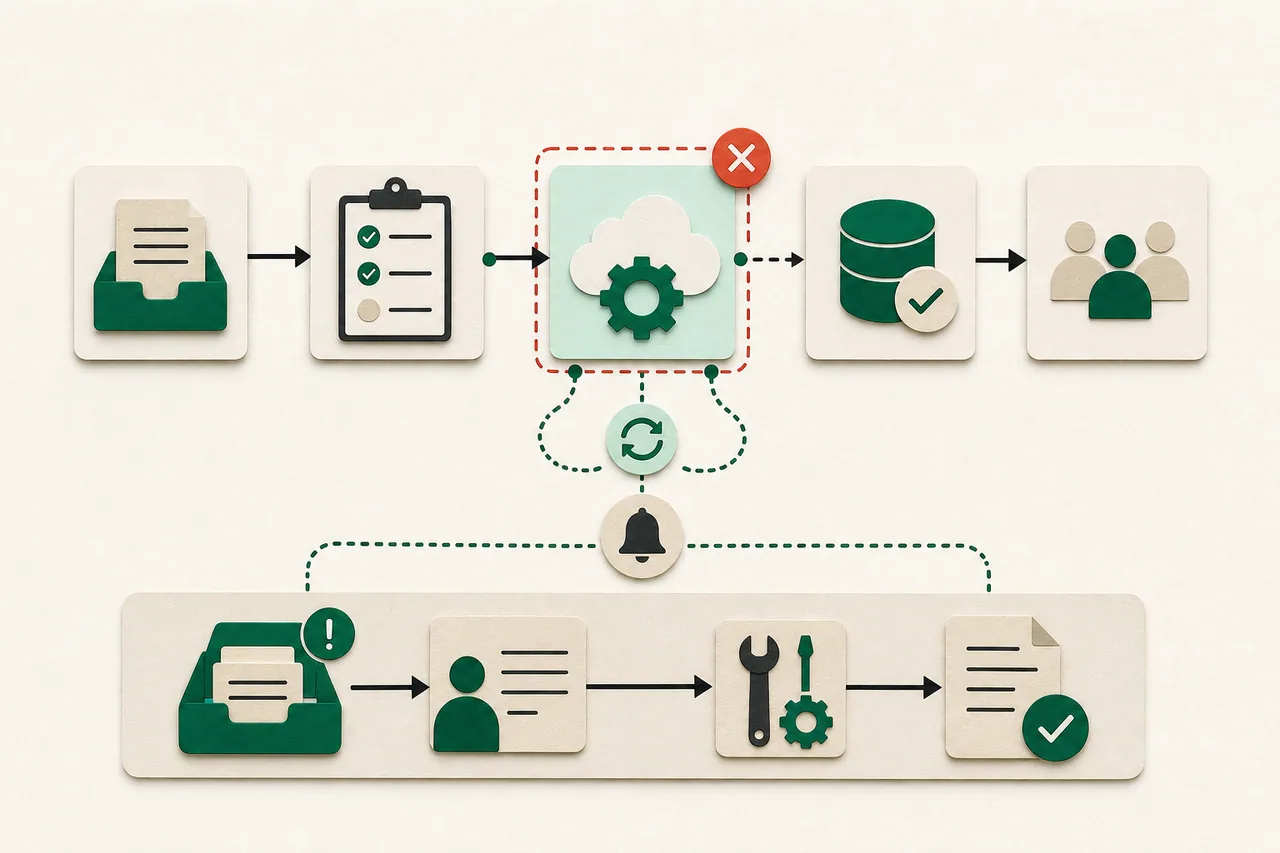
Map the critical event, make completion measurable, design for duplicate and delayed messages, add an owner and recovery queue, then simplify the chain until failures are visible and repairable.
What to do in the first hour
- 1.Pick one business-critical automation and write its trigger, expected result, acceptable delay, system of record, and human owner.
- 2.Check recent run history for failures, retries, throttling, expired credentials, changed fields, and runs marked successful even though the business outcome did not occur.
- 3.Export or document the current workflow before editing. Record connection ownership and renewal dates.
- 4.Create a manual fallback for urgent cases so stabilization does not hold customers hostage.
Diagnose before you buy another solution
Tool-level success is not business success. A webhook can receive a 200 response while the wrong record is updated, an email goes to the wrong address, or a downstream step silently skips.
Common root causes include shared personal credentials, renamed CRM fields, branching logic nobody owns, lack of stable identifiers, duplicate triggers, unbounded retries, timezone assumptions, provider limits, and workflows spread across several accounts.
Trace one real example across every system using timestamps and stable IDs. Mark where truth changes, where a retry could repeat work, and where a human can safely intervene.
A practical recovery plan
Define a reliability contract
For each critical automation specify expected volume, maximum delay, duplicate policy, required fields, success evidence, alert threshold, and owner. A vague requirement to 'sync the CRM' cannot be tested or operated.
Create idempotent behavior
Use a stable event or business identifier so repeating the same message does not create a second invoice, lead, task, or email. Record processing status and distinguish retryable failures from permanent validation errors.
Add a failure inbox
Route failed or suspicious items to a visible queue with the original payload, safe error detail, attempt count, and a replay procedure. Notify a named person only when action is needed; alert fatigue hides real incidents.
Reduce the chain
Delete unused branches, combine duplicate workflows, replace fragile screen scraping with supported APIs where practical, and keep one source of truth for customer identity and status. Fewer hidden handoffs mean fewer mystery failures.
Test changes with ugly data
Use missing fields, accented names, duplicate submissions, old records, out-of-order events, provider downtime, and expired credentials. Confirm the business record and customer communication, not only the automation dashboard.
Questions to ask before approving more work
- What exact evidence proves this automation completed the business outcome?
- Can the same event arrive twice, and what happens if it does?
- Who owns each connected account and how are credentials renewed?
- Where do failed records wait and how are they replayed safely?
- Which steps can be removed without changing the outcome?
Red flags
- — The fix is to add more retries without understanding duplicate effects.
- — Critical automations live under a former employee or freelancer's personal account.
- — There is no way to reconcile source records with destination records.
- — A daily 'everything is fine' email substitutes for actionable failure monitoring.
- — Nobody can manually complete or safely replay the workflow.
When to bring in specialist help
Bring in security or compliance expertise when automations move sensitive data across vendors, and accounting expertise when they create financial records. If records are already corrupt, stop automated writes, preserve logs, and reconcile before replaying events.